free site design templates

MyStops AUTO


Your business was selected to participate in the 2018 Commercial Vehicle Travel Study for the Laredo, Rio Grande, and San Antonio areas. The MyStopsAUTO app will help us collect information on the trips that typical commercial vehicles in these study areas make during a regular business day.

Please install the app on your smartphone (Steps 1 and 2) below and minimize the app screen to allow it to work in the background. If you do not wish to review the detected stops, please ignore Step 3. 

1. Download and Install the App

On Android phones, the MyStopsAUTO app can be downloaded and installed directly from the Google Play store. For iPhones,download MyStopsAUTO from the App Store .  

Special Notes
(1) An older Android phone or tablet may require updating of Google Play Services before MyStops AUTO can be downloaded and installed.

(2) Before downloading the Android version of MyStopsAUTO from our website, on your phone/tablet, go to Settings-> Security-> and check the box next to "Unknown Sources". This will allow the app to install. MyStopsAUTO is 100% safe to use. 

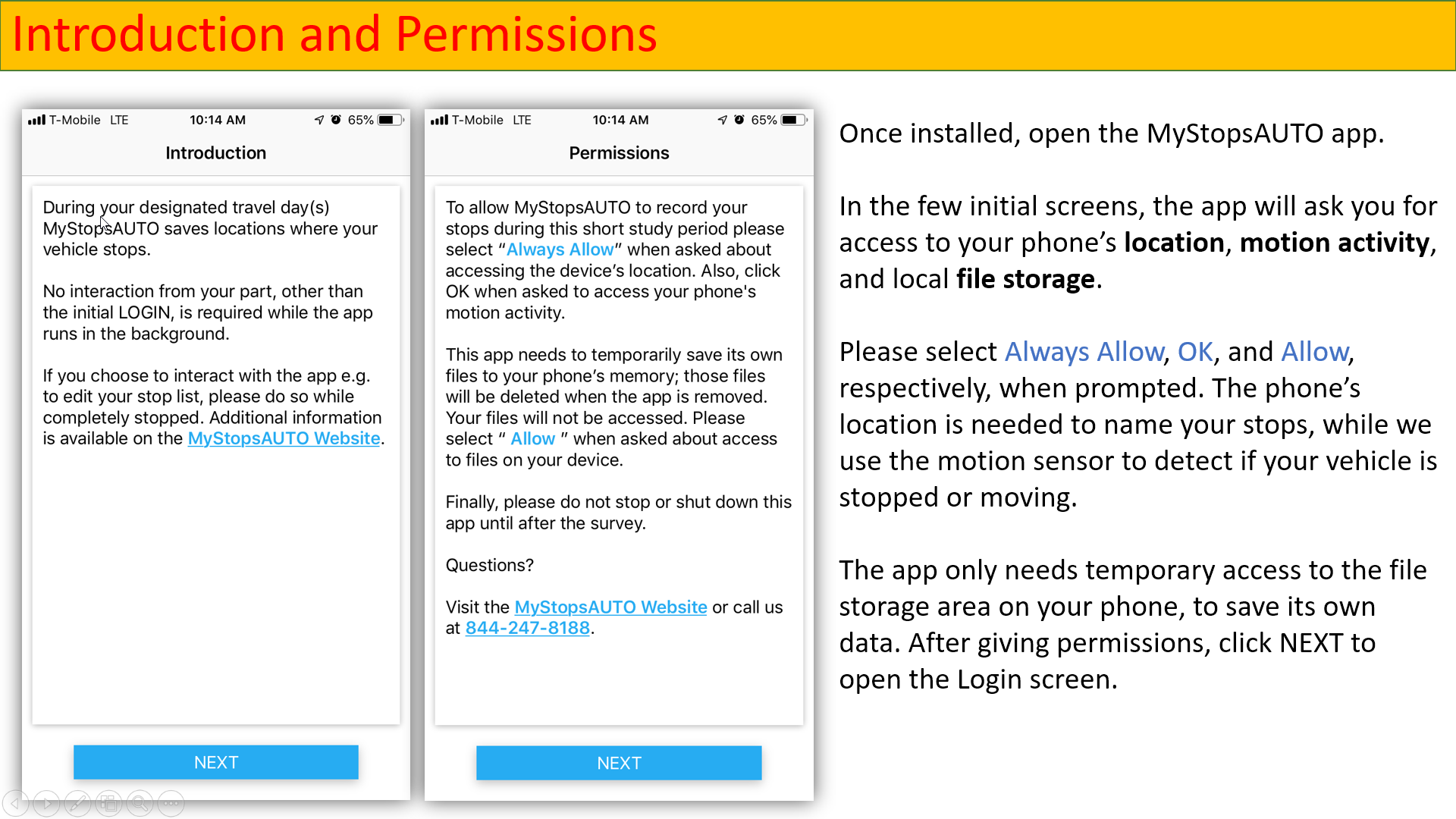
(3) During or after installation, MyStopsAUTO will ask for your permission to "access photos, media and files" - this is needed to save (temporarily) travel diary data to your device. MyStopsAUTO will not access any personal data or photos on your device. 

(4) MyStopsAUTO can be located on your device by looking for its icon, See the the upper left hand corner of this page (a little truck). 


2. Start the App and Login

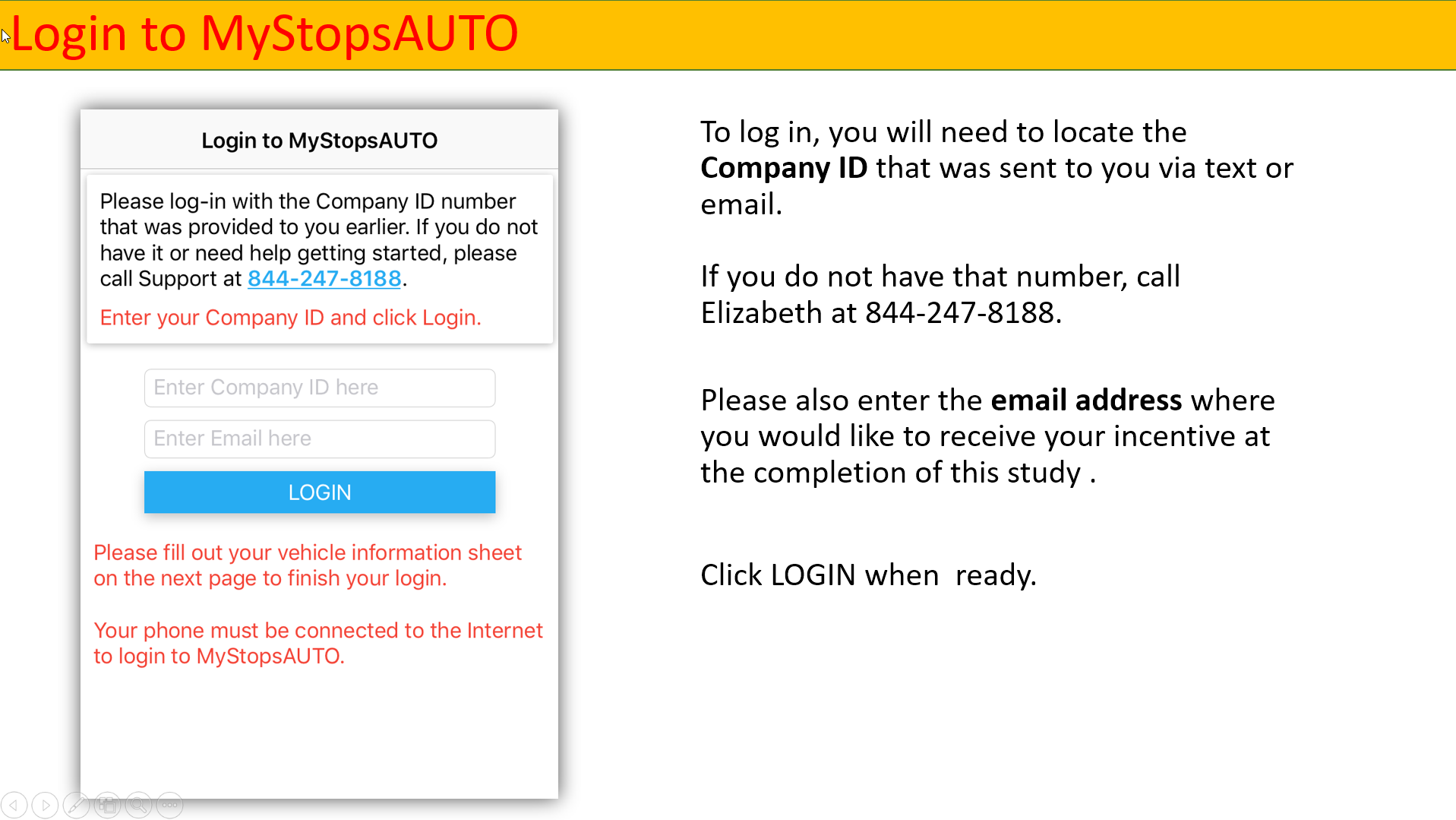
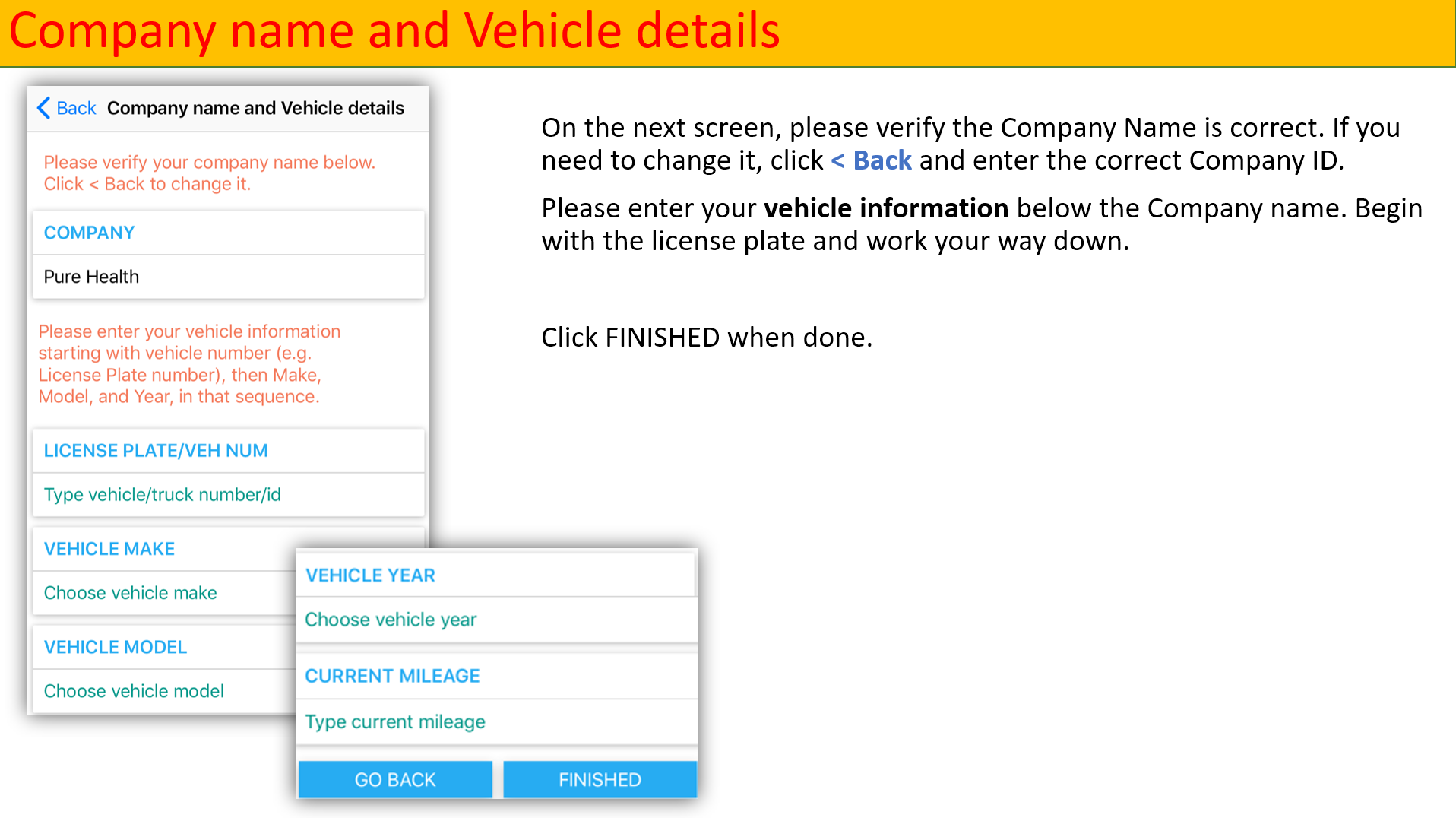
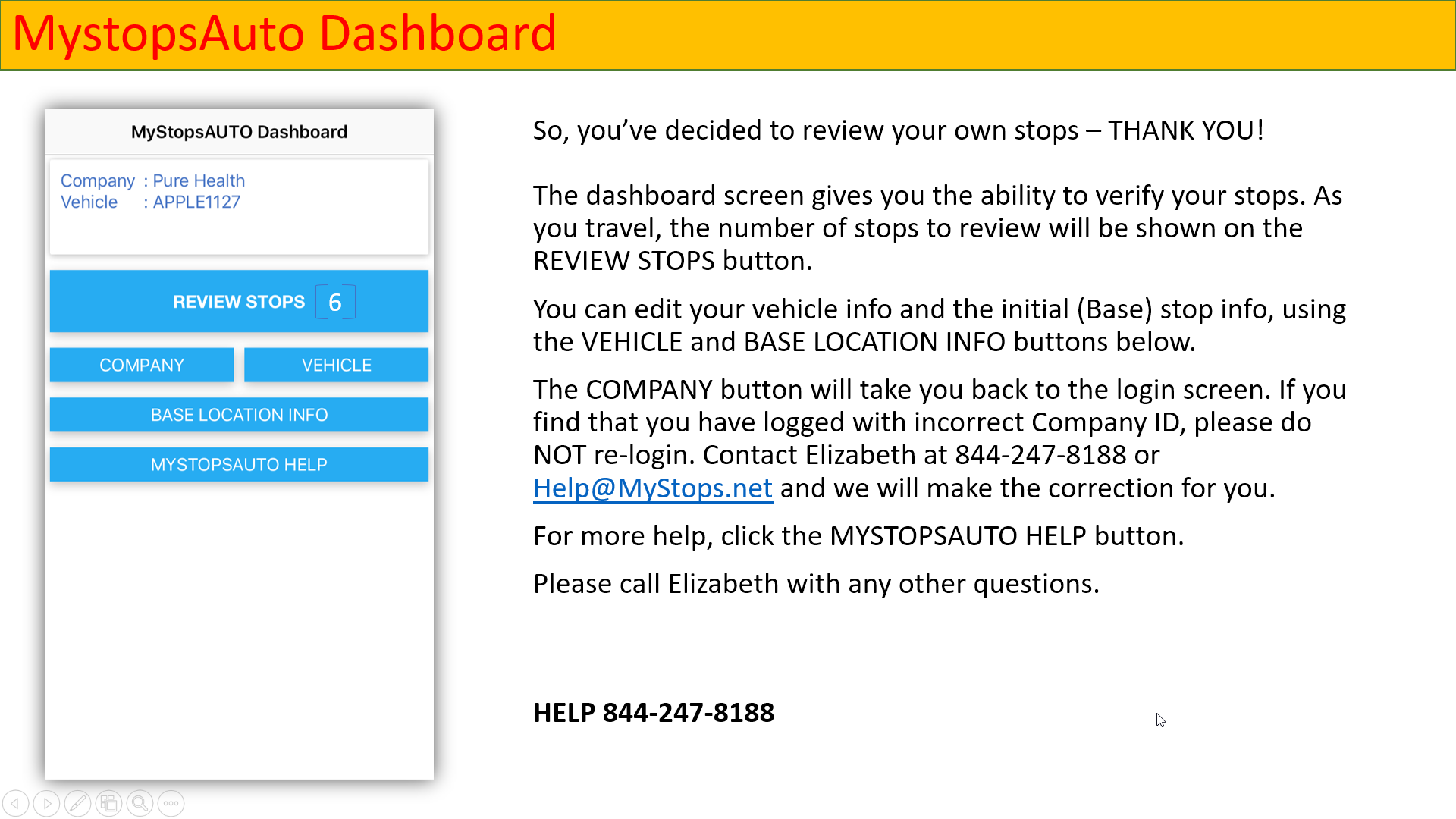
Start MyStopsAUTO and login by entering the PIN number that was provided to you. The PIN is your Company ID used in this study. After entering ther PIN number, your Company's name will be shown. Then provide your vehicle info and you are all set - the app will run in the background for 24-72 hours and can be then un-installed.  

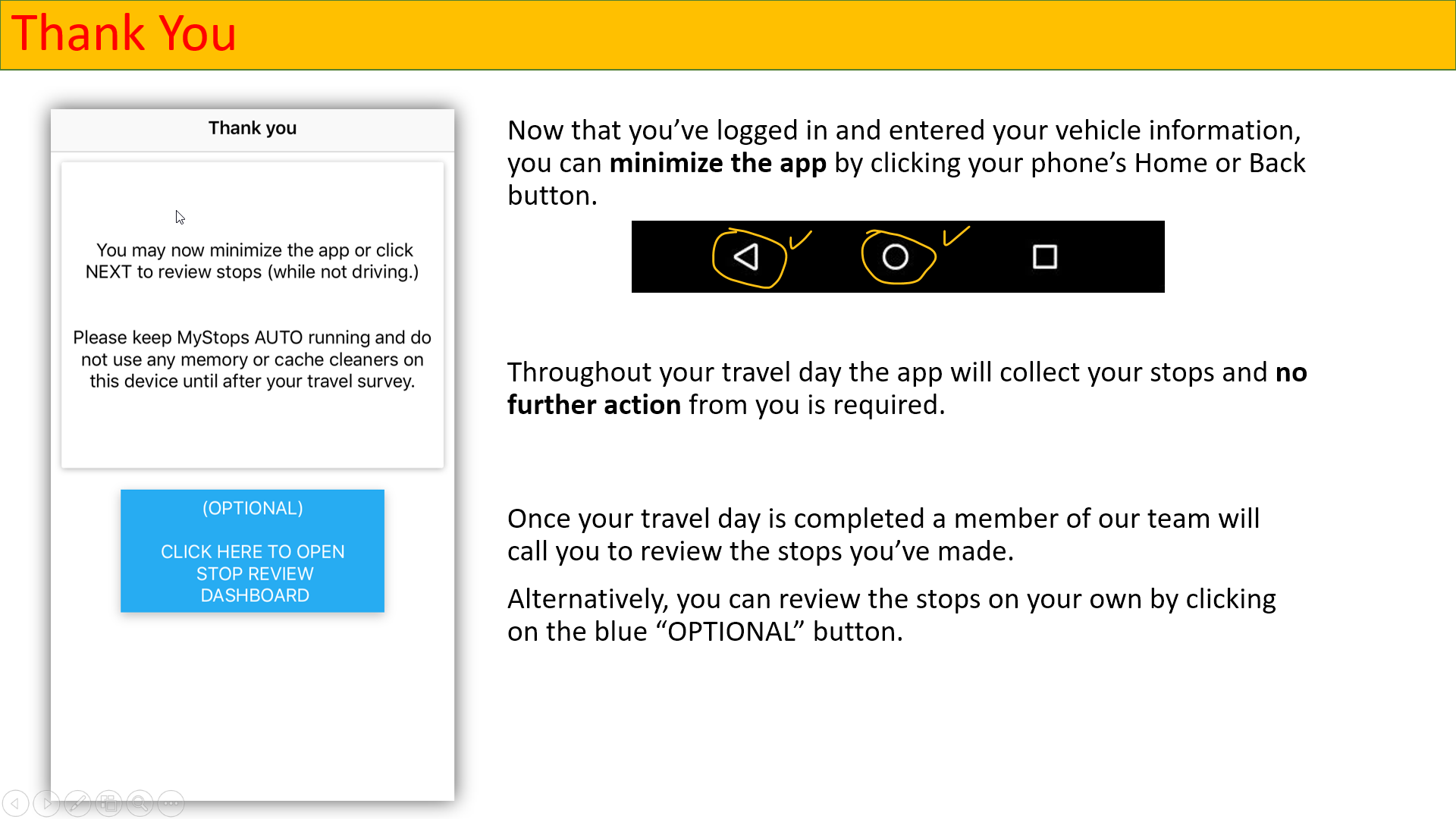
(Optionally, you can review your stops - while not driving - but that's not required. We will call you after your travel day to complete the process.)

Special Notes
(1) Please keep your Wi-Fi turned ON, even outdoors, to help keep the collected stop data accurate.  

(2) Allow your phone to have the "Location Services" turned ON, typically by clicking through these menus:
Settings-> Location-> On.

(3) Keep your phone plugged into a charger whenever possible, MyStopsAUTO uses GPS and may cause your device battery to drain a little faster than normal. 

3. (Optional) Confirm Your Stops

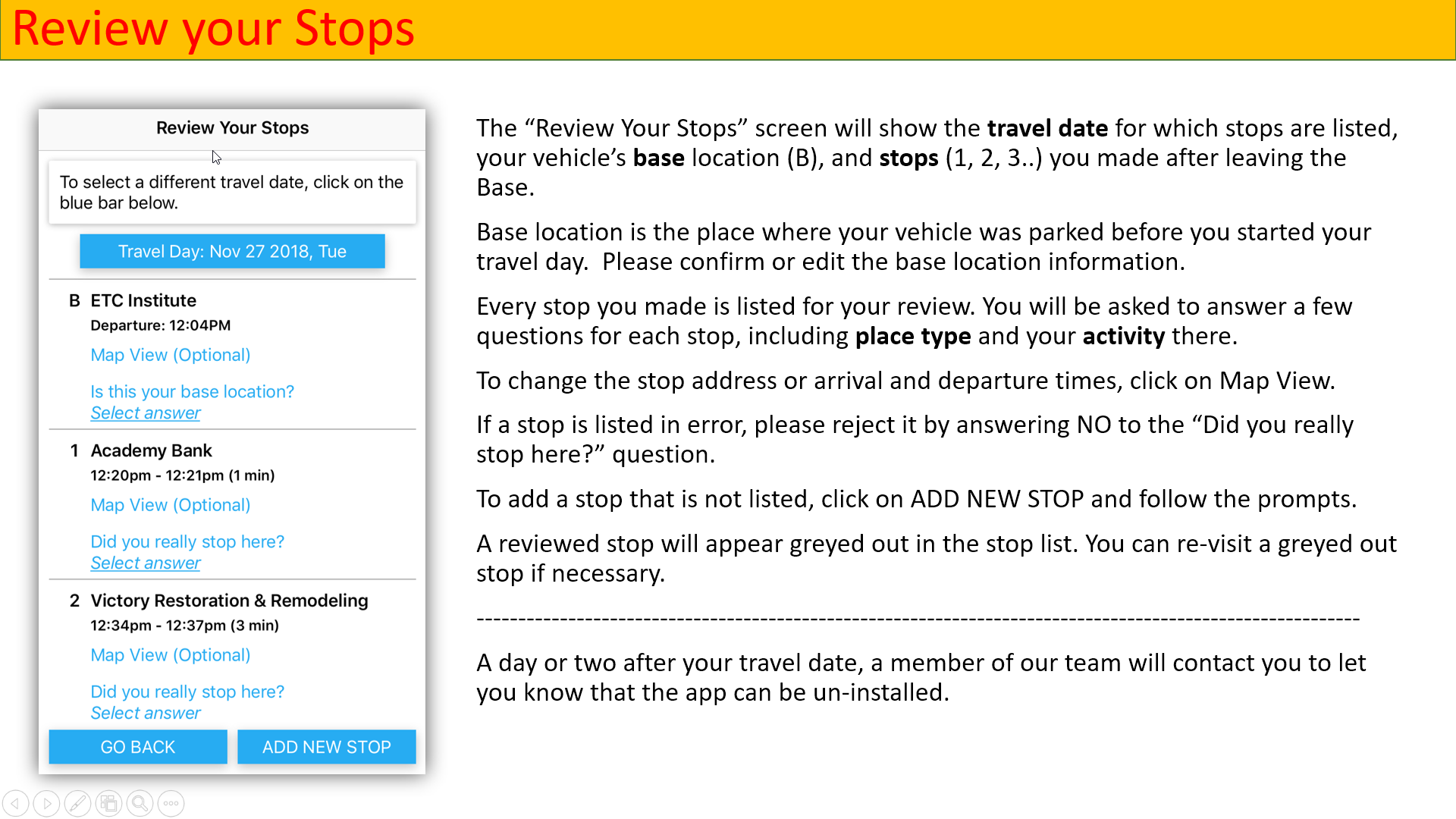
MyStopsAUTO will run in the background, detecting the stops you make throughout the day.   If/when convenient, you may open the app to confirm stops and answer a couple of questions about each stop. 

Special Notes
(1) Every time one or several stops are detected, MyStopsAUTO may insert a note into your phone's Notifications, so that you can know that there are stops waiting to be confirmed. If time permits and only when you are not driving, you may click the MyStopsAUTO icon to review / confirm as many stops as you can. 

(2) Note that it may take up to three (3) minutes for a stop to appear on the stop list.

(3) If you prefer to review your stops on a regular-size computer screen, go to MyStops AUTO Review. Here you can view all of your stops on a map and easily make changes, approve stops, and add new stops.
 

FAQ

Who is conducting this study?
This study is being conducted by ETC Institute on behalf of the Texas Department of Transportation. If you have questions or comments, please call Elizabeth or Heather at 844-247-8188 or contact us via the Contact form below. 

What is the MyStopsAUTO app?
MyStopsAUTO is a smarpthone app developed by ETC Institute to collect commercial vehicle travel information from participating businesses. The collected information includes all stops made by the vehicle during a regular business day, along with information about the type of place and cargo dropped off or picked up at each stop. 

How do I use the MyStopsAUTO app?
Please refer to the GET STARTED section above.

Can I verify my stops AFTER the travel day?
Each study participant may verify his/her stops via the MyStopsAUTO app. However, if that is not possible or inconvenient, we offer the MyStopsAUTO Review site where your stops can be edited and confirmed.  You will need to know your Company ID to use that site.

What happens to the data collected via the app?
Stop information from all survey participants is combined and tabulated for use in regional travel modeling by Texas Department of Transportation. ETC Institute does not share this information with other parties.

When can I uninstall the MyStopsAUTO app?
Please allow the app to run and collect a full day's worth of travel information, ideally, a full 24-hour period. Once you have had a chance to review the stops, the app can be un-installed. 

Why participate in this survey?
Your participation helps us to better understand how commercial vehicles of varying size and business type affect travel and traffic patterns in your area.  

What if I have more questions about how to complete the survey?
If you are having issues or questions about how to participate in this study, please contact Elizabeth or Heather at 844-247-8188. Both Elizabeth and Heather are qualified to walk you through the quick and easy steps to providing your Stops for just a one day period. 

I want to ask questions or provide feedback about the MyStopsAUTO app, how do I do that?
If you have specific comments or suggestions regarding the MyStopsAUTO travel app, please email them to Andrew Kolcz at Andrew.Kolcz@etcinstitute.com. Your feedback is extremely important to us as we continue to improve this data collection tool. 


HOW TO USE

To learn how to use the app, please click this link

Data Privacy

The information obtained through this study will only be used in combination with data from other participants for transportation research purposes by the Texas Department of Transportation. ETC Institute respects your privacy and uses state of the art technology and standard practices to protect your privacy. 

CONTACT US